See and log
eight precision sensor
channels
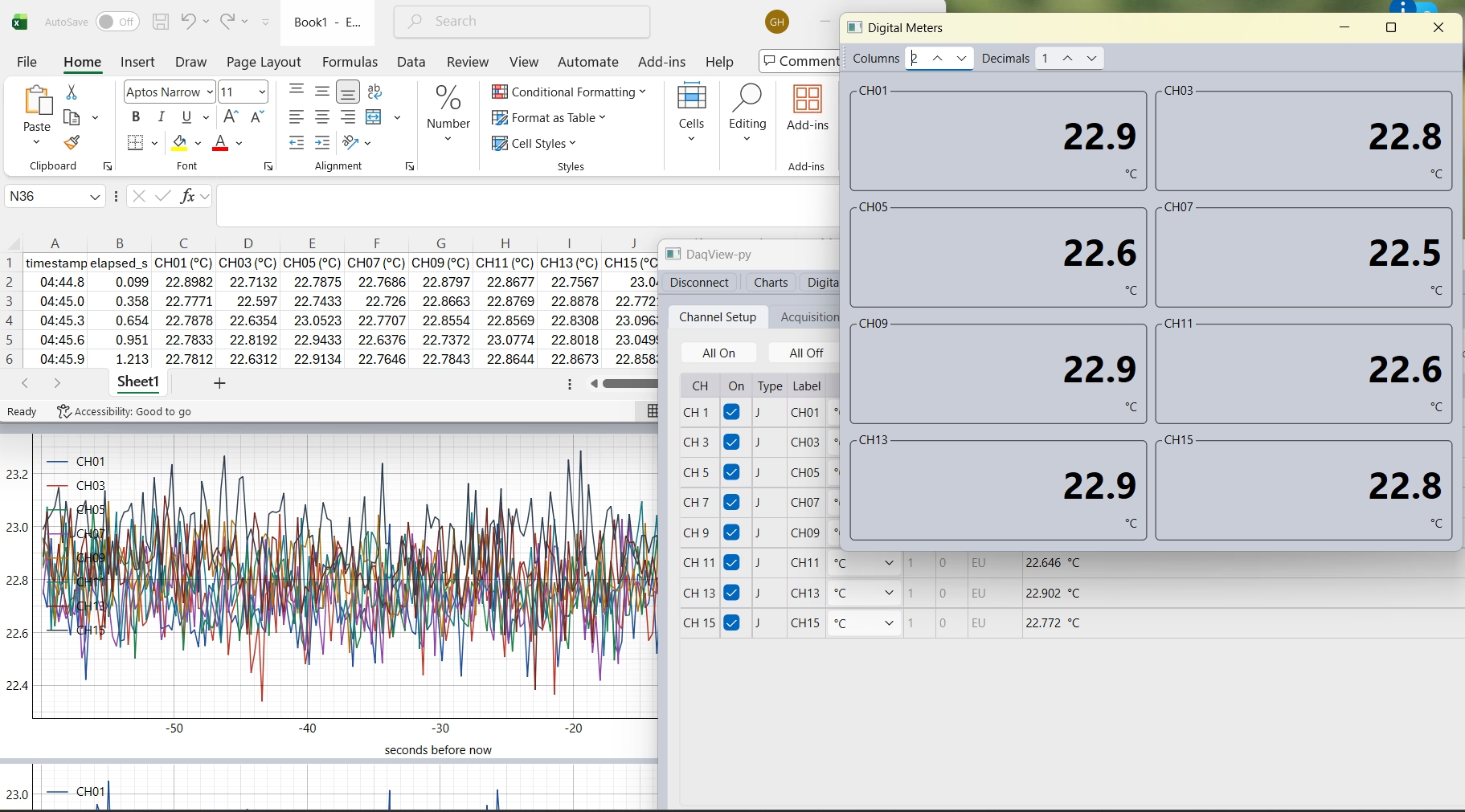
SensorVue is a Windows application for the iNet-650 Precision Industrial Sensor IO. Set up thermocouples, RTDs and thermistors, watch them on charts and meters, log them to file and stream live data into Excel in real time, with no programming.

Everything on one screen,
no programming
SensorVue connects to the iNet-650 over its TCP/IP server and shows every active channel in one table: sensor type, label, units, scaling and the live reading. Open as many views as you need beside it.
- Channel setup with labels, engineering units and linear scaling (m and b) per channel
- Charts with a selectable time window, one or more stacked charts and autoscale
- Digital meters in a grid, with adjustable columns and decimal places
- Logging to file with one click, from the channels you choose
- Real-time Excel: live readings stream straight into a spreadsheet as they are measured
- Setup files to save a complete configuration and open it again on any PC
- Instrument status at a glance: link, scan state, heartbeat, CJC temperature and reference voltage
At a glance
- Hardware
- iNet-650 Precision Industrial Sensor IO
- Channels
- Up to 8 differential sensor inputs
- Sensors
- Thermocouple, RTD, thermistor, voltage, current, resistance, load cell, strain gage
- Thermocouples
- Cold-junction compensated, open-thermocouple detection
- Views
- Channel table, charts, digital meters
- Logging
- To file, from selected channels
- Excel
- Live data in real time
- Configuration
- Saved setup files, portable between PCs
- Platform
- Windows
Watch every channel
your way
Each view reads the same live data, so you can arrange the screen around the job: a chart to see trends, a meter grid for the numbers at a glance, and the channel table for setup and status.
Charts
Pick the time window, stack one or more charts, and let autoscale follow the readings or fix the range yourself.
Digital meters
Large readings in a grid, with the number of columns and decimal places set to suit the room or the monitor.
Logging
Choose the channels and start logging with one click. The file records each reading with its label and units, ready to open for analysis or reporting.
Real-time data to Excel
Send live readings directly into Excel as they arrive. Build your own calculations, charts and reports in a spreadsheet you already know, updating while the test runs.
Where it is used
- HVAC supply, return and coil temperature monitoring
- Test stands and product burn-in
- Ovens, dryers and thermal processes
- Cold storage and refrigeration
- Laboratory temperature logging
- Commissioning and troubleshooting records
From sensors to a log file
- Connect sensors to the iNet-650 and start SensorVue.
- Set up channels: type, label, units and scaling.
- Open views: charts and digital meters.
- Save the setup so it opens the same way next time.
- Start logging to file, or stream live data into Excel.
SensorVue-Pro adds the rules engine
Everything in SensorVue, plus calculated values such as ΔT and averages, limit and alarm logic, and control of the iNet-650’s four digital outputs for relays, beacons and PLC inputs.
Compare SensorVue-Pro →Related solutions
Precision Industrial Sensor IO (iNet-650)
24-bit, 8 differential channels and 4 digital I/O lines, DIN rail mount.
Learn more →DASYLab data acquisition software
Graphical worksheets for acquisition, analysis, display and control.
Learn more →Multi-Channel Distributed Temperature Measurement
Many sensors, ROI-IOM nodes and one RS-485 cable to a PC or PLC.
Learn more →Want SensorVue set up for your equipment?
Tell us the sensors and what you want to watch, record or send to Excel. We will deliver the iNet-650 and a SensorVue setup ready to run.